Stand at a machine with a job in front of you. Three questions decide whether you’re on track: how long is this supposed to take, how long has it actually taken so far, and does that put you over or under? A shop-floor terminal that can’t answer those three quickly isn’t pulling its weight.
The v0.8.3 operator panel answers them directly.
Time, in units a human reads
First, a confession. Operation time in Eryxon Flow is stored in minutes — the same unit the
operator’s clock writes when they pause or finish. The terminal, though, was printing those
minutes with an h after them. A 90-minute weld read “90h”. Nobody welds a panel for ninety
hours; the label was simply wrong.
Now every time display in the operator views runs through one shared formatter and reads in plain units: 45m, 1h 20m, 2h. One function, one convention, no minutes wearing an hours costume.
Booked versus budget — and who’s been on it
The detail panel’s Steps tab now opens with the numbers that matter: time booked so far against the operation’s budget, an over/under chip, and a progress bar. Below it, the operators who worked the job, each with their own booked time, and a live dot for anyone running the clock right now.
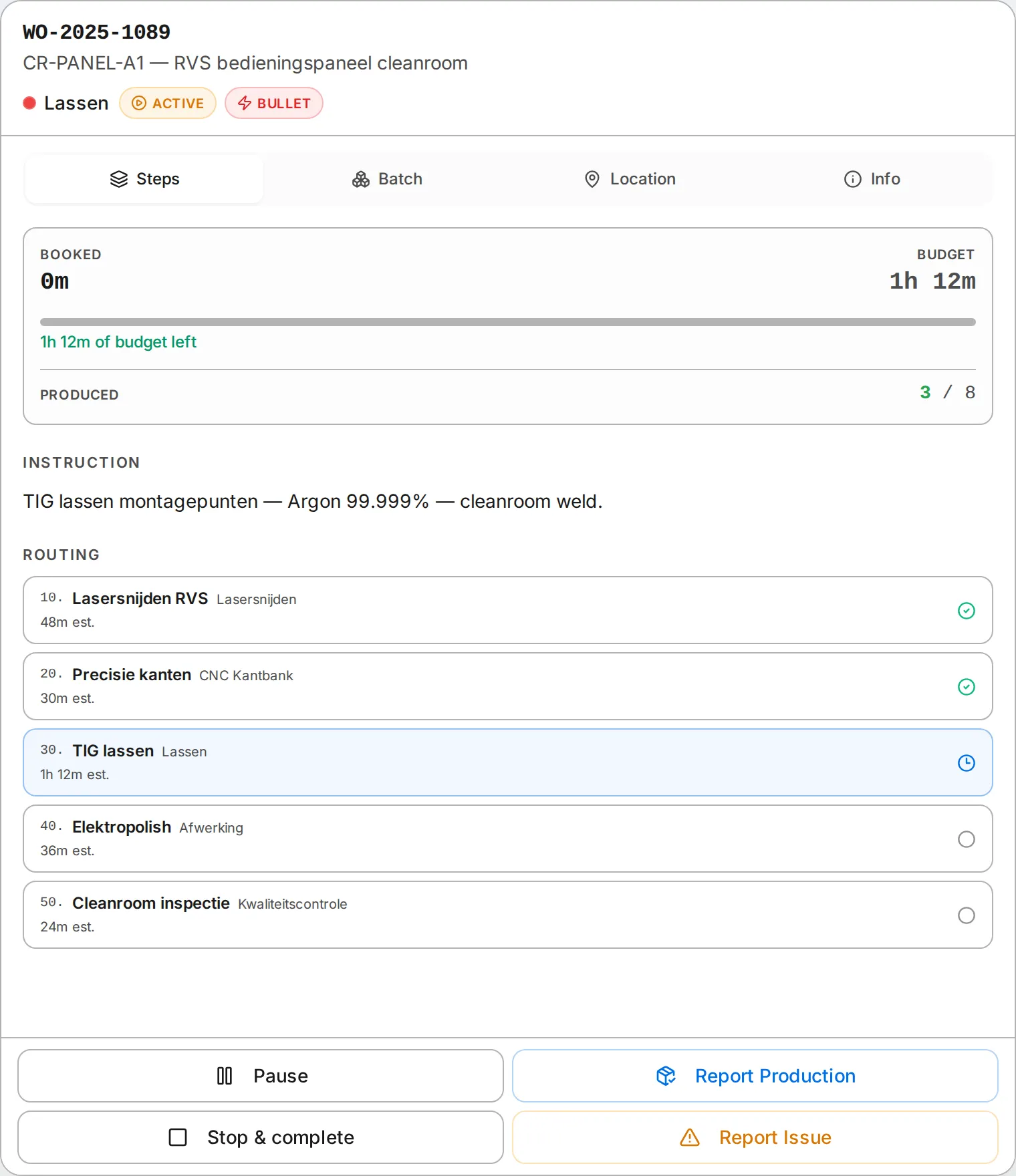 Booked vs budget leads the Steps tab, the instruction is clearly labelled, and the routing reads in real units — 1h 12m, not “72h” (demo data shown).
This is a guide, not a gate. It tells a team leader where an operation stands; it never stops the operator from working.
Complete shouldn’t fight you
Finishing a job used to take two taps in the wrong order: you couldn’t Complete while the clock was running, so you had to Pause first, then Complete. Obvious once you’ve done it, but it’s a small daily papercut. Now Complete stops your own timer and finishes in one move — the button even relabels itself Stop & complete while you’re clocked on. It only holds back for a real reason: another operator still clocked on, or the next cell at capacity.
The boring fixes that matter most
Behind the visible changes, v0.8.3 corrects three time-tracking bugs: duplicate clock-entries (from the occasional double-tap race) were stored in seconds instead of minutes and their time was never added to the job’s total, and the live booked figure ignored pauses — so it would visibly drop the instant you clocked off. Those are the kinds of bugs that quietly erode trust in the numbers, which is the one thing a time-tracking system can’t afford.
Read the full list in the v0.8.3 release notes, or see the whole operator path in the operator terminal docs.